 Mobile. Mobile. Mobile. Everyone is talking about mobile and smartphones these days and the importance of having a mobile site. But do you really need a mobile site? How do you know? A little digging in Google Analytics can give you some clues (you do have Google Analytics installed I hope)…
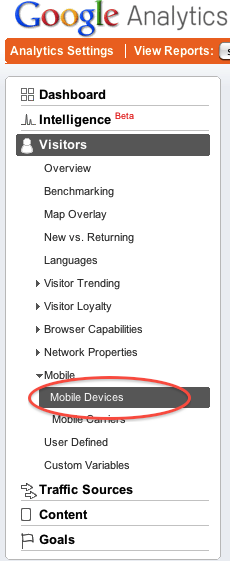
Click on Vistors in the left menu, and then on Mobile Devices.
Then take a look at how many visits you get on various mobile devices. Compare this number to your total number of visits.
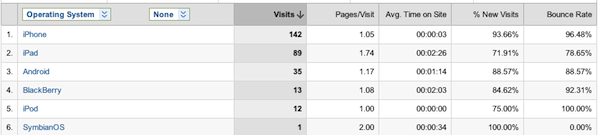
If you get a lot of visits from iPhones and iPads, they have a pretty good browser for showing regular sites on the smaller screen. Also take a look at the average time on site and your bounce rate for each device. If you’re getting a lot of visits, but they’re not staying long, you may want to consider having a mobile site.
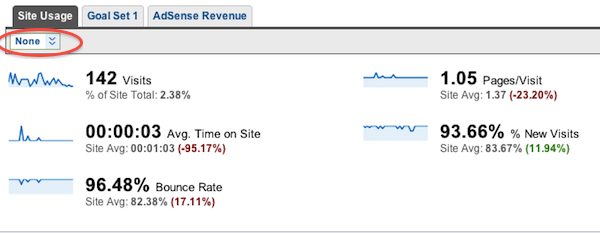
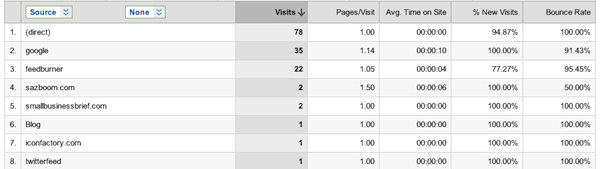
For more information about where the traffic is coming from on those mobile devices, click on one of the device names. Then click on the drop down box that’s right below the Site Usage tab.
Select Traffic Sources and then Source.
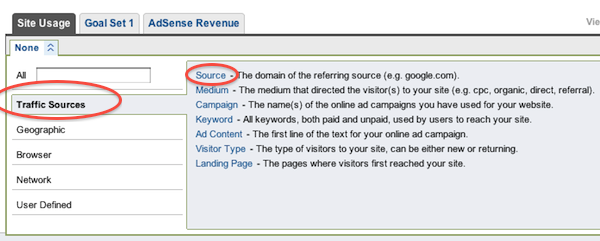
Now you can see where you’re getting traffic from on that particular device which can give you a lot of information about how people are using your site. You may find that traffic from some places is spending more time than others. This can help you decide whether or not it makes sense to create a mobile version of your site.
If you do decide to create a mobile site, take a look at the stats available for that mobile site to make sure that it’s an improvement for your visitors. Also, ask them what they think!
Do you have a mobile version of your site? How did you decide and what tools are you using?
(photo by blakespot, on Flickr)