 Knowing about unusual traffic on your website or blog can help you determine whether or not certain campaigns or promotions are working. Being aware of events or sites which are sending you traffic is also important. Google Analytics provides a nice tool for alerting you to unusual patterns of traffic on your website or blog which is very useful for these purposes — Intelligence. Let’s take a closer look at some of the information you can gather from Google’s Intelligence…
Finding Intelligence
The Intelligence tab is easily found under the Dashboard link in the left menu of Google Analytics.

Daily Alerts
The default is to show your daily alerts, which will show your visits for the past 30 days, and underneath you’ll see a graph of any alerts based on automatic alerts for Google Analytics or AdWords, as well as custom alerts that you can set up. If you click on one of the alerts, you’ll get details for the alert (what the source is, what metric triggered the alert, whether it was higher or lower than normal, and what significance the alert has). An alert is triggered when one of your metrics for your site is either higher or normal than expected (based on past performance and trending information).
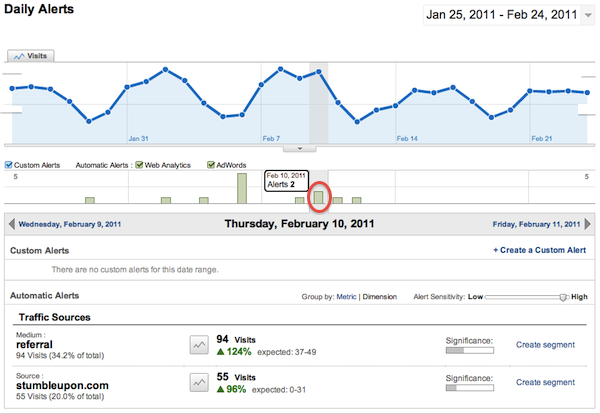
Even more detail is available if you click on the graph icon next to one of the alerts at the bottom — showing you the general graph of the particular metric and how it looked different during the alert day.
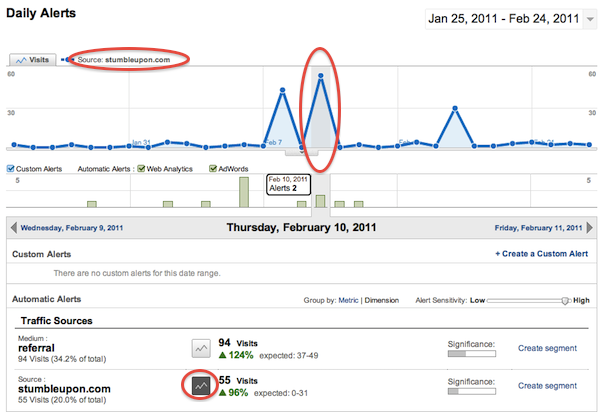
Here you can see that stumbleupon.com sent an unusually high amount of visits on Feb 10th. Google was expecting between 0-31 visits and there were 55 visits on that day. Looking at this graph you can also see why the traffic was higher than expected relatively to what might be “normal” traffic from stumbleupon. This is useful because then you can go back and look at what post what stumbled and try to figure out why it was especially popular (title, content, keywords, other).
Weekly Alerts
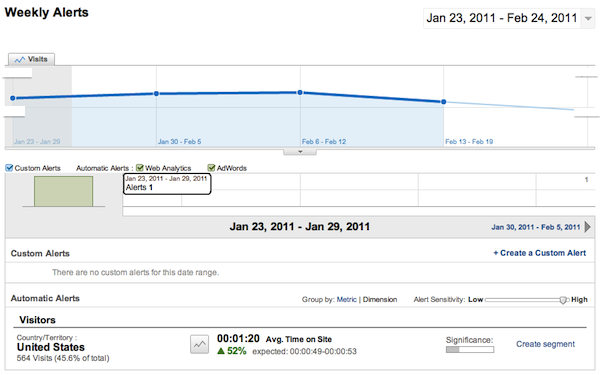
Weekly alerts will show you similar data with alerts for metrics that are higher or lower than expected when your site metrics are considered a week at a time (instead of a day at a time for daily). Weekly alerts can help you identify weeks where traffic may have been higher (or lower) than normal due to either internal or external activities (to help identify what those activities or events may have been). The same type of information is available for weekly, with more detail by clicking on the graph icon next to a specific alert.
Monthly Alerts
As you might expect, monthly alerts look at your site’s traffic metrics over a month’s time and compare them to what is expected (both from previous months and from looking at the same month the previous year). I’ve seen some really interesting information from monthly alerts because you’ll often see spikes in traffic for popular landing or exit pages when you look at the past year or comparing the current month to the same month last year.
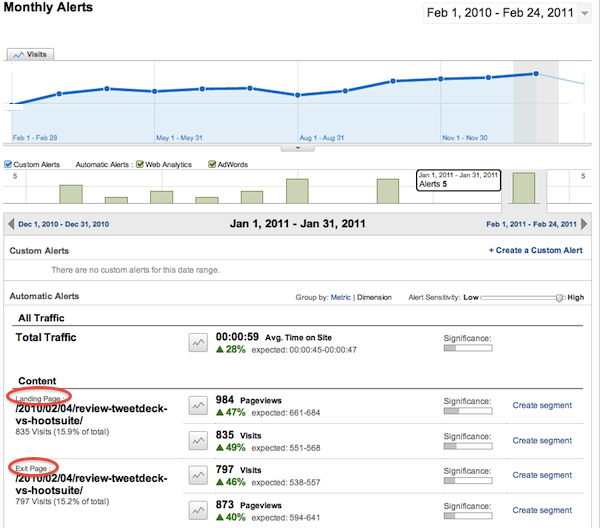
Here you can see that 2 specific pages, one a landing page, one an exit page, saw higher than expected traffic. Now that I know about the spike, I can take a closer look at what might have caused it.
Useful Data = Used Data
Any data is only as useful as how you actually use it. Google’s Intelligence is nice because it really lays out what’s going on without requiring a lot of digging into the details and more advanced features of Google Analytics. Intelligence is especially useful for finding sites (referring sites) which are sending you traffic that you may not have been aware of (so you can leverage that in the future — possibly build a mutually-beneficial relationship), as well as identifying possible influencers in your network (people who may be sending you traffic via a site or social network). Using the data to continue to build your business makes the data useful.
Do you use the Intelligence tab in Google Analytics? How?
(photo by Robert Scoble, on Flickr)