 Amy from FinishedBasementsPlus asked how to have her blog feed into Twitter using HootSuite. While Amy may be a client, this is a pretty commonly asked question, so I thought I’d share with everyone. In order to use HootSuite to feed your blog into Twitter, you’ll need a few things first: 1) A blog with a feed (which I suggest sending through Feedburner) 2) A Twitter account and 3) a HootSuite account.
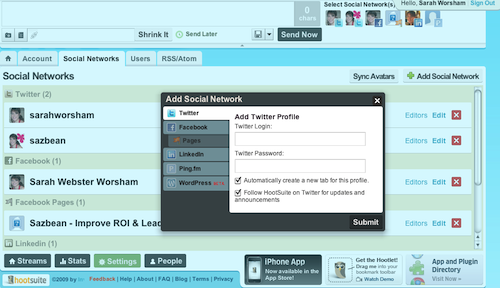
First, you’ll need to give HootSuite access to your Twitter account. Login to HootSuite. Click Settings at the bottom of the page, then click on the Social Networks tab. Click on Add Social Network towards the upper right. Click Twitter and enter your Twitter username & password (I suggest selecting the checkbox to automatically creating a new tab for the profile as well). Click Submit.
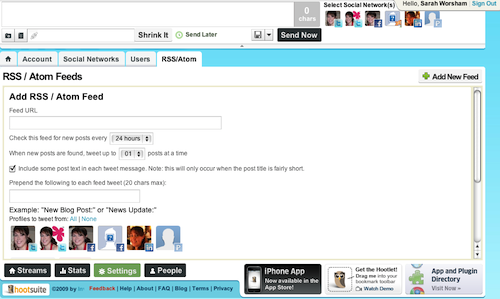
Next, click on the RSS/Atom tab, then on Add New Feed towards the upper right. You’ll need the actual URL for your feed – paste that into the Feed URL field. Set how often you want HootSuite to check your feed – I have it check mine every hour since I post a couple times a day. Set how many posts you want it to tweet at a time (you can set HootSuite to check only once per day, but to tweet multiple posts, for example). If you’d like it to automatically add some text to the beginning of your tweet, add that into the field “Prepend the following to each feed tweet (20 chars max):” – I have it add “Sazbean.com:” since I have other links in my Twitter. Select your twitter feed for “Profiles to tweet from” (you can select multiple, although sending the same thing to multiple Twitter feeds is against Twitter’s terms of service – you could, however, send it to your Facebook profile, Facebook fan page or LinkedIn feed). Click Save Feed.
That’s it! Now HootSuite will automatically tweet your blog posts for you (plus send them to the other social networks you selected).
Do you have a question you’d like us to answer? Email us at asksazbean at sazbean.com.
Liked this post? Consider subscribing to Sazbean.com through RSS feed or by email or following us on Twitter.
Technorati tags: social media, content strategy, content, marketing, sharing, social networking, business