 A vitally important part of achieving success with social media is responding when someone does reach out to you. When you’re just starting with social media, this may seem like a pipe dream, but if you’re not watching for responses, you may miss them when they happen. As your social media presence grows, it’s equally crucial to monitor for mentions and responses so they do not become lost. I use HootSuite as my main Twitter application, which not only has monitoring, but also stats and scheduling. Here’s how to setup HootSuite to monitor Twitter for mentions, responses and keywords…
1. Choose the Twitter profile and click the “+ Add Stream” button.

Select the tab for the Twitter profile you want to setup for monitoring (this assumes you already have HootSuite set up with your Twitter profile) and then click the “+Add Stream” button in the upper left.
2. Select the Twitter profile & Select the Type of Stream from the drop-down menu.
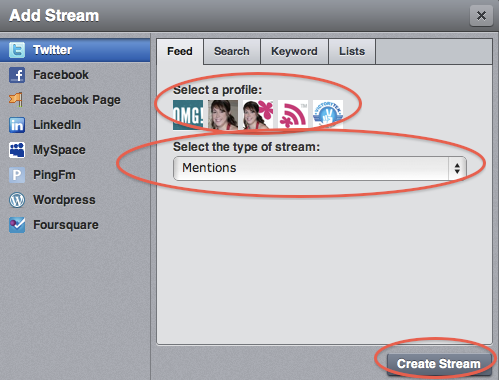
Choose the “Mentions” stream and click the “Create Stream” button at the bottom of the window.
3. Check for the Mentions stream under your profile.

Now you’ll be able to monitor when someone mentions your twitter name (uses the @yourname) –you may have to scroll the window horizontally to see the stream.
4. Repeat step 1, now choose the Search tab under Twitter.
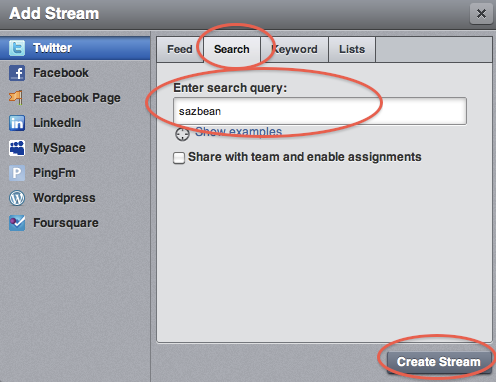
Enter in your twitter name into the search query box and click the “Create Stream” button at the bottom of the window.
5. Check for the search stream under your profile.

Now you’ll be able to see anytime someone includes your twitter name in their tweet. I use both the mention stream and the search stream because they seem to pick up different tweets.
6. Repeat step 4, but enter your company name in the search query
Repeat and add search streams for your company name, product names, your actual name (i.e, Sarah Worsham), and keywords that are important for your product or company.
The Results
Now you can keep track of what’s being said on Twitter without having to read every single Tweet. Monitor for keywords, searches and mentions so you don’t miss anything important. Since you’re not reading every single tweet, you should have more time to respond and converse, which is the whole point of social networking.
How do you monitor Twitter?